
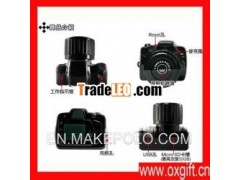

 Click image to view full size image


Description:
8000000 SLR the thumb-camera FuuviThis paragraph is true OV9712 HD camera, 800W HD pixels, 500Wpixels upgraded version of
This camera is very small, with no screen, no viewfinder, pro tothis return be refused on the grounds before making a must-see
The upgraded version of the for Y3000 hardware support 1280 *720 resolution up to 30 frames / sec.
OV9712 HD Camera, 1280 * 720P format to AVI
Official Standard: camera, lanyard, USB line
Product Features
Pixels: 8, 000, 000
Image Quality: 3264 × 2448 pixel (jpg)
Recording: 1280 × 720 pixel / 30fps / M-JPEG
Exposure: Automatic
White balance: Auto
Memory card: mircoSD
(Memory card sold separately, maximum support 32GB)
Power supply: Built-in lithium battery
Support Plug and Play USB1.1 / 2.0
Dimensions: 30 × 27 × 27mm; Weight: 11g
Operating system: of Windows98SE / ME / 2000 / XP / Vista / 7 /MACOS
Note: This product is no screen, the screen is decorated parentswho pay attention to before you buy
Instructions for use:
1 Power: in the off state, press and hold the power button for 2seconds, blue lights, the machine directly into the standby prefix= o ns = "urn: schemas-microsoft-com: office: office"
Card machine is not booting, automatic shutdown blue lights flashfive seconds
Shutdown: long press the power-on button for 5 seconds, themachine shut down.
Low power: When detected when the battery voltage is low, the bluelight flashes three times to save the video files automaticallyafter shutdown
Photographs: In standby mode, short press the power button, theblue lights flash once, after taking pictures into standby
Video: In standby mode, long press the power-on button for 2seconds, blue lights flashing, the machine into the camera status,short press the power button, the machine stop recording and savethe file, the blue light.
6. File Storage
Completed video or photographs, use the USB data cable toconnect the device to your computer, the recorded copy or cut tothe computer screen to play
Note: Do not connect the computer to video or photograph;shutdown connect the computer to the device when the mobile diskusage
7. PC camera: normal boot connected to the computer USBinterface, you can enter the PC Camera (webcam) mode, in this mode,you can use the camera as a PC camera, video chat with friendsonline, Recorder, Snap, and so on.
Note: depending on your computer configuration or systemdifferences, the computer may not be able to detect the camerafunction the occasional computer can not enter the camera functioninto a removable disk, remove the camera and re-connected computerin the boot of the camera; you first use your computer PC camerafunction of the camera, please install the camera driver inside theCD-ROM or dealer.
8. Charging: connect computer or charger to charge the machine,slow flashing blue light when charging the battery is fully chargedblue light
9. Set the time: the camera has the function of recording time,video file format: year month day: minutes: seconds Y-/ N, theset-up time is as follows:
a. create a new extension. "TXT" Notepad file, which follows theformat of the input (note the date and time of the spaces in themiddle) 2010.01.19 11:42:30 Y / N the time you want set time,please carefully check the text format, in order to ensure thecorrect format, Y / N takes time watermark, select Y for the outputtime watermark, select N compared with time watermark (time formatinside Y / N only allowed to enter a )
The b. rename the file to "TIME.TXT.
c. connect the camera to the computer, wait until the computer to aremovable disk drive letter, "TIME.TXT" copy files to a removabledisk root directory.
d. uninstall hardware, boot time is set.
e set a good time will be saved to the camera inside.
Exception handling:
The camera stopsresponding due to the occasional improper operation or otherspecial reasons, with the reset tool inserted into the reset hole,press and hold the reset button to reset.
Thumb camera
